My EuroBSDCon talk on the fist 10 years of Unix is up. EuroBSDCon Unix at 50, V7 at 40 I hope you enjoy.
20191027


20191010
Video Footage of the first PDP-7 to run Unix
Hunting down Ken's PDP-7: video footage found
In my prior blog post, I traced Ken's scrounged PDP-7 to SN 34. In this post I'll show that we have actual video footage of that PDP-7 due to an old film from Bell Labs. this gives us almost a minute of footage of the PDP-7 Ken later used to create Unix.
The Incredible Machine
The Incredible Machine is a Bell Labs film released in 1968 and available on youtube here: https://www.youtube.com/watch?v=iwVu2BWLZqA It outlines a number of innovative computer things that Bell Labs was doing around audio and visual things with different PDP machines from DEC. Pretty cool, right? Especially because this film features the song "Daisy" sung by a computer, a plot point that would feature heavily in Stanley Kubrick's 2001: A Space Odyssey. (although that plot point was set in 1962, and was based on work done by IBM with the first song sung by a computer).
I'll concentrate on footage from 9:19 to 10:31 in the film. This footage talks about making computer made music. If you listen to the audio, it sounds quite quaint, although when it was made it was cutting edge.
Making the case that it's a PDP-7
Here's a screen shot from 9:43 in The Incredible Machine. From it we can make the case that we're looking at a PDP-7, hereafter called TIM PDP-7.
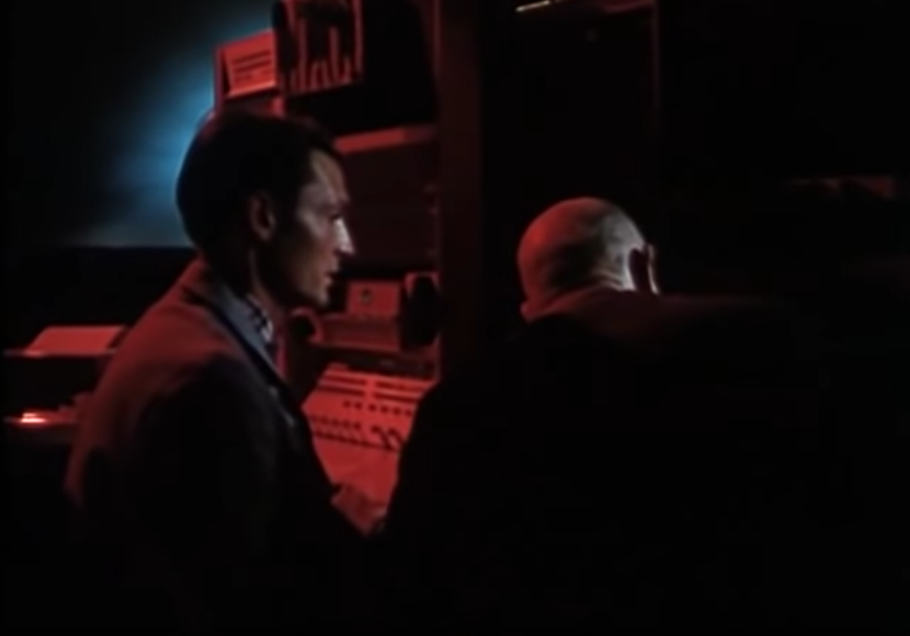
The screen shot looks a little boring until we compare it against two photos of PDP-7s from the archives. The first one is photo from a DEC PDP-7 sales catalog that's available online at https://www.soemtron.org/pdp7.html. The second photo is from SN115 from a machine in Oslo from the Institute of Physics that's been semi-restored (picture also from Soemtron).
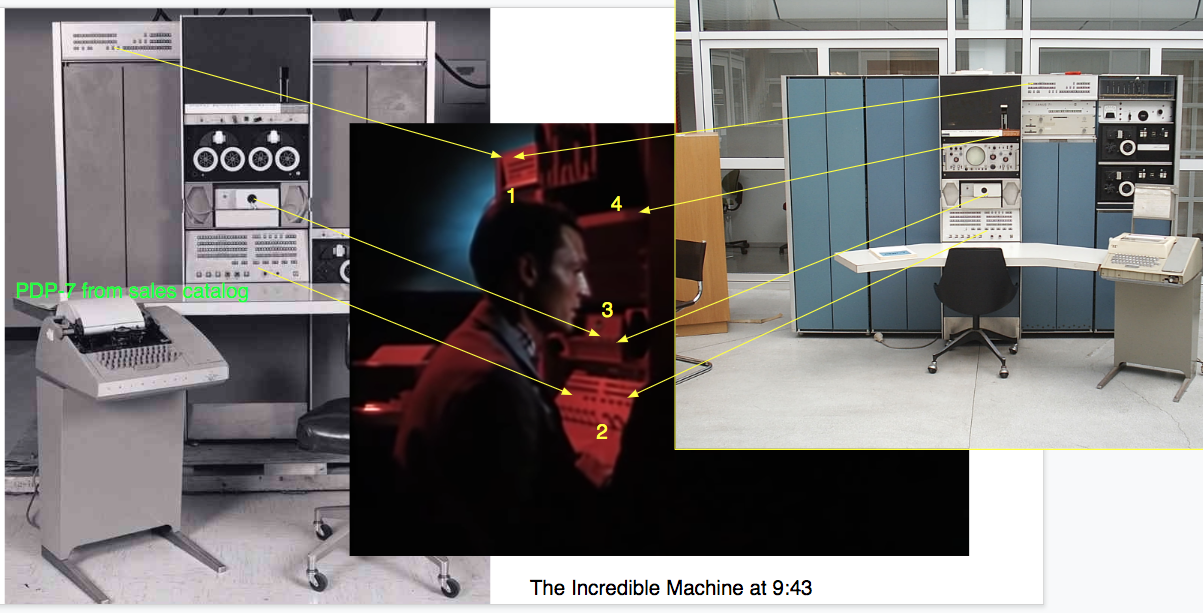
I've superimposed the three photos together and highlighted 4 areas of convergence with numbers:
- The register panel that reports the status of an expansion cabinet. This is clearly visible in both photos in similar places.
- The control panel. It's clearly the same between these two photos. The control panel is used to examine and modify memory contents of the system as well as displaying internal registers of the PDP-7.
- The paper tape reader (option 444B). This reader is also visible from 9:19 to 9:30 in The Incredible Machine reading in a new program.
- Is the PDP-7 name badge. Although it's quite obscure in these photos, its clearly the same.
So, I think it is safe to conclude that the computer in this footage is a PDP-7. We have two different pictures of actual PDP-7s that the computer in The Incredible Machine clearly corresponds to. I'll leave it as an exercise for the reader to exclude all the other machines from that era, though my experience suggests that the register and control panels should be enough.
Hunting the Serial Number for this PDP-7
So we have found footage of a PDP-7 from Bell Labs. That's cool, can we push the envelope further and track down which serial number TIM PDP-7 might be? Let's look at the key features of the machine in the picture above and the video footage.
- Option 444B, paper tape reader (Also seen in 9:19-9:30 in The Incredible Machine)
- Option 340 Display (seen 10:06-10:14 and 10:22-10:25)
- Option 370 High Speed Light Pen (seen 10:06-10:25 as well)
So, if we look at the PDP-7 field service list available at https://www.soemtron.org/downloads/decinfo/18bitservicelist1972.pdf (itself a excerpt of a more complete one at bitsavers), we find there's two machines with the display and light pen: SN 34 and SN149.
Ken's machine (SN34) has all these options:


The other candidate machine (SN149) in the list has them as well:
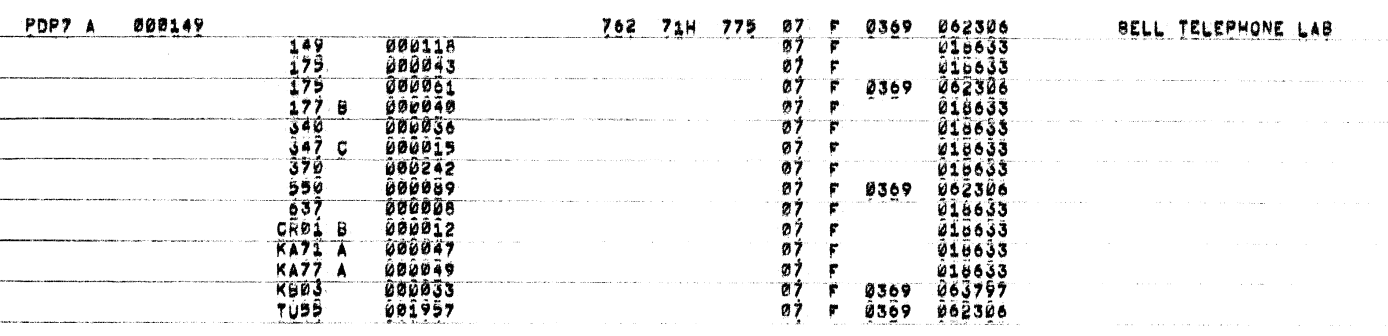
So how can we decide which is which?
If we look at dates, we see that the SN34 machine was in place early enough to be in a 1968 film with an installation date of 1965. SN149 appears to be too late with a 1969 date. However, that's not conclusive. The other fields are blank and SN148 and SN150 both have 1967 dates. It's weakly suggestive, so we need more. We can't eliminate it based on dates, as pleasing as it would be to do so.
We may be able to eliminate the TIM PDP-7 as SN149 because TIM PDP-7 clearly had the Option 444B paper tape reader, and SN149 doesn't list that in the field service log. Based on this we can exclude SN149, but only weakly because the paper tape readers were common.
Can we make the case stronger? The service logs show that SN149 has a Option 550/TU55 which is a DECtape and controller, while the SN34 does not. Ken Thompson has confirmed there was no DECtape, just paper tape on the machine he used. If we could confirm this machine didn't have a DECtape, our case would be strong for it being SN34.
Looking at the footage is hard because it is so dark. Even so, we can see a blank panel over the Option 444B paper tape reader shown starting at 9:19, though it's hard to be sure. If we look at the 9:43 frame above, we can't tell. When the color balance is adjusted we see the following:
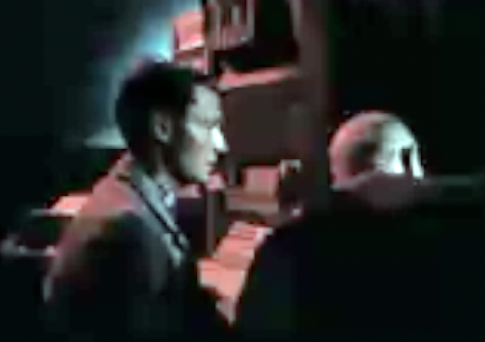
we can clearly see here the card reader from the initial footage and what appears to be a blank panel above. There's no tell-tale circles that would indicate an installed DECtape there. Single stepping the video with this enhancement shows no other targets. There is something weird just over the younger gentleman's head, but it's not a DECtape.
Looking at the field log, the DECtape components were serviced in 1969, after this film was made. It's not clear if this was when the parts were added, or if they were merely repaired or replaced. After studying the field service log for a while, I thing we'd bias our data towards replacement rather than installation. Especially since there's no other bulk input media, like a paper-tape, listed.
Pulling it all together: we have clearly found a PDP-7. There were only 4 PDP-7s shipped to AT&T. Only two had the 340 display option clearly seen in the film. Of those two, one had DECtape, the other had a paper-tape reader. We know from Ken that his had a paper-tape reader. There's no DECtape evident in this film, but clear evidence of the paper-tape reader. It's not known where either SN34 or SN149 lived inside Bell Labs, but we know that Ken used a machine that had been cast off from the Visual and Acoustics Department. While the film doesn't list the internal departments that contributed to it, the computer generated music strongly suggests it could have been the Visual and Acoustics Department. Taken together, we can say that three lines of evidence support that the PDP-7 in The Incredible Machine from 9:19 to 10:30 would later be used by Ken to create Unix.
20190709
The PDP-7 Where Unix Began
Serial Number of First Unix System
In preparation for a talk on Seventh Edition Unix this fall, I stumbled upon a service list from DEC for all known PDP-7 machines. From that list, and other sources, I believe that PDP-7 serial number 34 was the original Unix machine.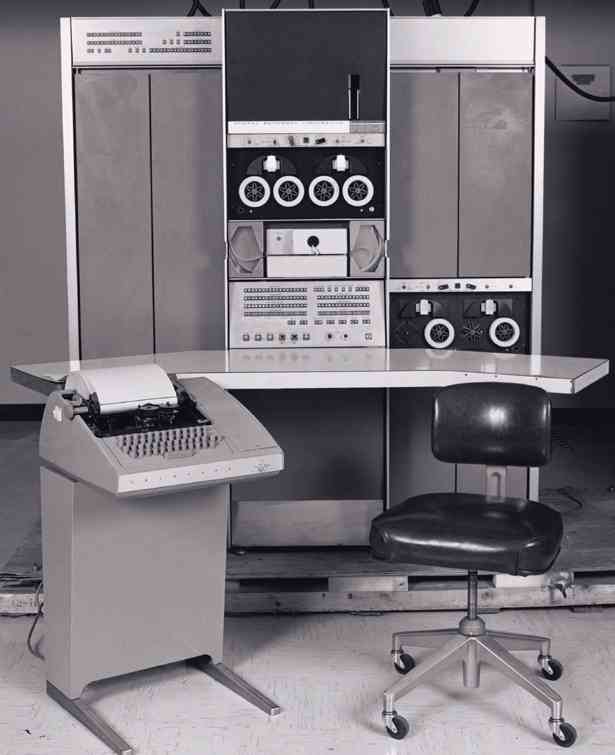 |
| PDP-7 System from DEC sales literature |
Building The Case
We know from simh sources, the restored PDP-7 Unix version 0 sources, and recollections from the time that the original machine used by Ken Thompson and Dennis Ritchie had, or likely had, the following hardware:- 8k word of memory (option 149B)
- A tape reader (option 444B)
- A tape punch (option 75D)
- A 1MB disk drive (RB09 same as an RD10)
- A tty controller for a teletype (option 649)
- A standard video display (option 340)
- A custom video display (Unknown option number)
- A keyboard for input (also option 340)
We know from the service list that Bell Labs had three PDP-7s and one PDP-7A. Several of these machines had the standard options (the tape reader and teletype) and extra memory. Only one system, serial number 34, also had a disk drive, a custom unknown board that could be a Bell Custom display, and the standard display. In addition, that system shipped to Bell Labs in 1965 and appears to have been refurbished in 1969. This timeline matches the oral histories describing a discarded PDP-7 used to bring up the system in late 1969.
Here's the full table of all the systems shipped to Bell Labs with each system's options, taken from the 18 bit service list provided by Bob Supnik. You can check the list for other contenders.
Another surprise
V0 Unix could run on only one of the PDP-7s. Of the 99 PDP-7s produced, only two had disks. Serial number 14 had an RA01 listed, presumably a disk, though of a different type. In addition to the PDP-7 being obsolete in 1970, no other PDP-7 could run Unix, limiting its appeal outside of Bell Labs. By porting Unix to the PDP-11 in 1970, the group ensured Unix would live on into the future. The PDP-9 and PDP-15 were both upgrades of the PDP-7, so to be fair, PDP-7 Unix did have a natural upgrade path (the PDP-11 out sold the 18 bit systems though ~600,000 to ~1000). Ken Thompson reports in a private email that there were 2 PDP-9s and 1 PDP-15 at Bell Labs that could run a version of the PDP-7 Unix, though those machines were viewed as born obsolete.Please see this followup post where I make the case that footage of the PDP-7 Ken would later use has been found on youtube....
20190211
Strange Code
Now That's Weird
I was trying to compile some ancient code I pulled off the net. It is related to the Venix stuff I've been doing on and off of late.
This code originally ran on BSD 4.1. The only system that version of Unix ran on was a VAX (later versions were more widely ported, but 4.1 was more of a limited distribution version). OK, looking up the movc3 instruction on vax references online, we see it is the "Move Character" instruction. r8 is the length. srcaddr is (r11) and dstaddr is (r7). So in effect, someone has done an inline of bcopy() here. Now, that's half of the problem. The other half is puzzling out what is in r7, r8 and r11 at the time of this call. In a perfect world, I'd just crank up the compiler to tell me. We live in an imperfect world where spinning up a 4.1 BSD system takes a substantial amount of time.
Fortunately, we can guess. cnt -= put gives us our first clue. We're decrementing by how much we copied, it seems. So r8 (the length) is put. OK. Now, we have this nice variable named 'to' that was most likely in the dstaddr (so r7), and we update it after (to appears only to be here for the side effect, so that's nice). But what's the from? The only thing it could logically be is 'p' since we += it by put as well.
So my best guess is that can be replaced by memcpy(to, p, put); and life will be good. My spidy sense also tells me that we don't need memmove here because they aren't overlapping ranges.
So that's weird, right. What the heck is that movc3 doing in the middle of that code.put = bp->b_nleft;if (put > cnt)put = cnt;bp->b_nleft -= put;to = bp->b_ptr;asm("movc3 r8,(r11),(r7)");bp->b_ptr += put;p += put;cnt -= put;goto top;
This code originally ran on BSD 4.1. The only system that version of Unix ran on was a VAX (later versions were more widely ported, but 4.1 was more of a limited distribution version). OK, looking up the movc3 instruction on vax references online, we see it is the "Move Character" instruction. r8 is the length. srcaddr is (r11) and dstaddr is (r7). So in effect, someone has done an inline of bcopy() here. Now, that's half of the problem. The other half is puzzling out what is in r7, r8 and r11 at the time of this call. In a perfect world, I'd just crank up the compiler to tell me. We live in an imperfect world where spinning up a 4.1 BSD system takes a substantial amount of time.
Fortunately, we can guess. cnt -= put gives us our first clue. We're decrementing by how much we copied, it seems. So r8 (the length) is put. OK. Now, we have this nice variable named 'to' that was most likely in the dstaddr (so r7), and we update it after (to appears only to be here for the side effect, so that's nice). But what's the from? The only thing it could logically be is 'p' since we += it by put as well.
So my best guess is that can be replaced by memcpy(to, p, put); and life will be good. My spidy sense also tells me that we don't need memmove here because they aren't overlapping ranges.
20181217
Adding additional revisions
Adding other directories
Sometimes you need to add commits from other places / directories to a repo you've slimmed down. This post uses the timed example to offer some advice.
SMM.doc
Fortunately for us, the SMM.doc directory was moved late in the game. As such, it was easy to edit the commit stream to remove that commit, and then replay all the commits that came after it. Fortunately, there was only one to remove the 3. clause (advertising clause). That was done by hand, committed and the original commit message pasted into the log. I then used git rebase to order this commit in the right place temporally.
etc/rc.d/timed
For this directory, I followed a different path. After looking at this file (or should I say how it is currently called libexec/rc.d/timed), I determined there were only a few real commits. Since there were only 10 commits, I just created a dumb script to run in the FreeBSD root of a github mirror repo:
#!/bin/shWhere /tmp/3 had 'git log etc/rc.d/timed' filtered to remove all the bogus commits (eg the merge ones).
j=1
d=/tmp/timed-junk
for i in $(grep ^commit /tmp/3 | awk '{print $2;}' | tail -r); do
git show $i etc/rc.d/timed | sed -e s=/etc/rc.d=/rc.d=g > $d/$(printf %04d $j)
j=$(($j + 1))
done
Once I had these in place, I was able to then import them into my repo by cd'ing to the root and running
git am --patch-format=stgit /tmp/timed-junk/*I oopsed and let a merge commit sneak through, and if you do that too, you can just delete the file in /tmp/timed-junk. Also, don't know why it didn't autodetect the format, but with an explicit format it just worked.
This produced 9 commits that resulted in the same timed file as was in svn. I cheated a little and omitted the movement commits, and since this is in git, $FreeBSD$ isn't expanded. This time, I didn't bother to sort them into the stream chronologically since I have no automation to do that and 9 commits by hand was more than I had time for.
Push the result
Since I rebased, I had to do a forced push. Should someone come along and want to make this a port, I'll do the sorting of commits then and do another forced push then publish the final results under FreeBSD's github account rather than my own personal one.
Splitting up a git repo -- Single directory
Splitting up a git repo -- Single directory
FreeBSD has a large, sprawling svn repo that was once a CVS repo. There are times that things in that repo have outlived their usefulness. Sometimes those items are best moved to a FreeBSD port. One easy way to manage a port is to toss it into a github repo and have the port point there. This article discusses how to do that. While it should be 'easy' to get a clean history has a few gotchas.
Clone the FreeBSD repo
If you are contemplating moving something out of the FreeBSD repo, one way to do that is to take the FreeBSD github mirror and trim it. When doing this, I always use a new repo, but in theory you could do it in an existing repo. Given how much is tossed away, it's best to use a fresh copy to avoid disaster. Disk space is cheap, right? Here's what I used to kick off pulling timed into a separate repo.
git clone https://github.com/freebsd/freebsd timed
First pass at trimming
When one googles the topic, git filter-branch comes up. The canonical answer is a good starting point:
git filter-branch --prune-empty --subdirectory-filter usr.sbin/timed masterwill do the first pass. This will leave just timed as the top level directory. For the moment, we'll leave aside the stray timed files elsewhere in the tree. That gets 'complicated' which will explore in the second part of this blog. It would be good to drop a 'go back' tag here:
git checkout -b timed-trimmedNow, this gives a decently trimmed tree. However, there are some problem. --prune-empty is a lie, or to be more charitable, it is incompletely implemented. It doesn't prune every single thing. Especially merge commits. Those are retained, but should be omitted. So the next step is use the very flexible history rewriting "feature" of git to remove them.
Next, use git rebase to rebase things. There may be more smooth ways to do this, but I find the first version in the tree with git log | tail, and then do my rebase like so:
git rebase -i HASH_OF_FIRST_COMMITNow the fun part starts. For each commit you suspect of being a merge commit, you have have to see if that hash is included in the output of the git log --merges command above. Remove all those commits. However, this can be hard. If you have a *LOT* to sort through, it's easier to make one pass for the obvious cvs2svn and MFC commits, but if you miss one it's not the end of the world. It's also a good idea to save an unmodified version of this file. It will come in handy later if your efforts lead to only a couple of missing commits.master
You can 'fix' the todo as you go, though this is tricky. Basically, when you hit an error, it's because the prior commit deleted everything as part of its 'merge'. So, to back up one, you need to just do this set of magic, I'll show, then explain:
git rev-parse HEADGet the hash this prints
git rebase --edit-todoAdd 'pick
git reset --hard HEAD^This resets the current mess (which is still in the todo list) back to one before HEAD. At this point, you're back one commit in the rebase and have effectively skipped the troublesome commit.
git rebase --contThis reapplies what was HEAD and then proceeds. See Git Rebase Stepping Forward and Back for more info. It turns out things are a bit tricky in that you want to make sure you are dumping the bad commit, and keeping earlier ones, and the behavior, especially when multiple branch merges happen, is a bit variable.
In the timed example, I needed to do this about a dozen times. I suspect that will be fairly typical as I had similar issues when I created the ctm repo.
Test: did I do it right?
Next, you need to make sure that you did things correctly. There's always a chance you'll drop commits that shouldn't be dropped. I ran a diff against my base FreeBSD tree and noticed that at least one commit was lost, so I had to go find it. So I missed 3 or 4 commits, and I had to go back and try again, so I had to use git reflog to find the result of the filter-branch and start over.
After I redid things (which I've not reproduced here, the second time was much easier) I did the diff and found one commit missing. I found it in my original todo file, so was able to do the rebase again, add it to the end (to make sure it applies) and then move it to the right place chronologically....
Push the result for testing
I created a new upstream (that was my personal space, not FreeBSD which I don't have permission to push to). I created a new repo, then pushed the 'master' branch from this repo upstream. I know I'm missing the docs (which ironically were copied away early on) and the rc files. Those will be covered in the second part of this.
20181116
Backing up git repos on multiple machines to central repo w/o collision
Git Tree Management
Here's a quick column about git. It's not a complete how-to or tutorial, but more an interesting way to manage multiple trees.
The problem: I have a dozen trees on a half dozen machines. I'd like at least backup all the branches in these trees to github. Trouble is, I don't want branch names to step on each other. This can happen for a number of reasons, let's say I called something 'junk' by habit on N trees and don't want a push to screw that up...
Git's world view: To understand git, you have to understand that it is a graph of versioned trees with labels. Each node in the tree has the familiar hash, and some of the hashes have refs that the git branch command groks. It's all just a directed graph with labels under the covers.
Normally, you when clone a repo, all its tags magically change from foo to origin/foo (for some value of origin).
Enter refspecs
Turns out this has been thought of before. The answer is simple:
fred% git push origin foo:fred/foowill push the foo branch to your origin and rewrite its name to fred/foo. Don't forget to push master too.
Now when you go to barney and fetch, you'll have a bunch of remote branches named origin/fred/foo, etc.
Costs
Since I'm doing this with a number of git svn trees, the cost is kinda high since git svn creates new, unique git hashes for all the upstream revisions to git svn rebase. It also means that you'll need to learn how to use the --onto arg of git-rebase, since if you want to move a branch from one repo like this to another.
barney% git checkout -b foo fred/foosince you're effectively creating a new name space on your local machine for the new branch. The rebase will now properly take just those commits from foo, and then play them back onto master on the current machine and leave you with a 'foo' branch for the results.
barney% git rebase -i fred/master foo --onto master
20181110
Most things in the VENIX emulator are working
SUCCESS
So I got tired of the terrible progress I was making chasing down issues. I thought if I could just create a simple program and get that working, I'd have much better luck.
So I wrote a simple K&R style C program:
int a=123;which printed the segment addresses and then locations of the segments.
int b;
extern char *etext, *edata, *end;
main() {
int c;
printf("CS: %x DS: %x ES: %x SS: %x\n", getcs(), getds(), getes(), getss());
printf("&data = %x &bss = %x &stack = %x\n", &a, &b, &c);
printf("etext = %x edata = %x end = %x\n", &etext, &edata, &end);
}
and I ran it on my old Rainbow running Venix.
I made some interesting discoveries. First, that there are two kinds of stacks (low and high) in addition to there being two kinds of binary (OMAGIC and NMAGIC). So my loader was all wrong. Next, I discovered I needed to jump to a_entry, not 0, to make low stack binaries work (all the ones I'd been testing so far were low stack, but somehow mostly worked when the stack and text segments were swapped).
Armed with this knowledge, I built 4 binaries (no flags, -z, -i, -i -z) to test all 4 cases. The -z ones worked (yea!) while the non-z ones didn't. My loader was right in this case, but I was returning EFAULT for all the writes. Why? Because I had a check in there to make sure the address was between 0 and brk. High stack binaries also have a valid area from sp() to 0xffff. When I added that change, all 4 test programs worked.
Of course, getting them from the Rainbow to the server was a challenge. The key to remember here is that you needed to use 'set line /dev/com1.m' on the rainbow so that kermit would on login port. I also had to down-clock to 2400 baud to get it reliable.
So, I started testing a lot of programs that failed to work before. Sort(1) is now working. ls isn't, but comes closer (it tries really hard to interpret a modern FreeBSD dirent as a v7 one and that's not so good, but that's fixable). nm is still giving me problems, for reasons unknown. I have enough things working, though, that I can start to try out as, ld and friends. Maybe even cc (though I'd need to get both fork and signals working for that driver program). /bin/sh fails missing dup() (and likely a bunch of others).
So excellent progress in the last few days.
20181104
Even more VENIX emulator progress
So in looking at the traces for why cal wasn't working, I noticed something odd:
I did that, and nothing else, and now cal(1) works. It produces correct calendars. As does od(1), uniq(1), pr(1) and others.
I've also implemented alarm(2), signal(2), lseek(2) and pause(2). With that, sleep(1) works (although it says 'Alarm clock' which suggests I need to actually establish a SIGALRM handler).
There's enough working I'm starting to need some kind of regression suite to make sure I don't regress and can publish the status of all the binaries... Maybe I could leverage an existing something...
What? I'm not super-duper strong on Intel assembler, but I sure know that 109e is not 109c. So what's going on here. After adding some more debugging, I discovered this was opcode 0xe9, which is a jump relative with word (so take IP and add the next two bytes to it). So, the code looked OK:0212:100D: jmp 0x109e
0212:109C: rcrw $0xff,0xdceb(%bx,%si)
Invalid opcode c1
doJump(ip + fetchWord());But looking more closely. It's oddly off by 2. Sow what's inside fetchWord()? Inside it effectively does ip++, twice. So, on the other compiler that was used for this code that I obtained from tkchia's reenigne repo had this flaw. it did fetchWord() + ip, rather than clang's ip + fetchWord(). So the fix was simple:
t = fetchWord();which made the order of operations well defined. A quick audit of the code shows no other places where this is done.
doJump(ip + t);
I did that, and nothing else, and now cal(1) works. It produces correct calendars. As does od(1), uniq(1), pr(1) and others.
I've also implemented alarm(2), signal(2), lseek(2) and pause(2). With that, sleep(1) works (although it says 'Alarm clock' which suggests I need to actually establish a SIGALRM handler).
There's enough working I'm starting to need some kind of regression suite to make sure I don't regress and can publish the status of all the binaries... Maybe I could leverage an existing something...
20181103
VENIX/86 emulator taking shape...
Frequent readers will recall my obsession with Venix on the Rainbow.
For the past year or so in my off moments, I've been trying to put together a Venix binary emulator. This is part of a larger project to reconstruct the Venix sources from the ancient V7 sources plus clues left behind in various images found on the internet in time for the 50th anniversary of Unix next year.
Early in the summer I had the loader written. I could successfully load a VENIX image and start it executing. sync(1) was working, but it did little more than call the sync(2) and _exit(2) system calls. stdio programs were still basically not working, though odd things like ln(1) also worked.
My project is now one step closer to fruition. I have been able to get some of the basic programs in /bin working with my emulator. The last step before getting to this point was finding a bug in the 8086 CPU emulation where the pointers to things like AH and AL for the AX register were wrong so that "movb al, 1" would set ah to 1... To find that I ported ddb from FreeBSD over so I could print out registers and disassembled code that's about to execute and pore over the changes to the registers until I could spot a problem...
With that fixed, all the super simple programs run. echo(1), cat(1), tr(1), and basename(1) run. However, other simple ones like rm(1), touch(1), ls(1), and wc(1) all run into problems.
touch(1) seems to be related to a bad implementation of stat(2), for example, that I've not had the time to chase down. mv(1) and rm(1) seem that way as well. No clue what's up with wc(1) or ls(1).
I think I should come up with some kind of test script(s) to make sure the basics work.
Venix Github repo has the 86sim program in it.
I hope to soon be to the point where everything except maybe fork/exec works. I'll need those for not only /bin/sh, but also cc. cc(1) is the reason that I want to make this work so I can rebuild everything quickly for the VENIX restoration project....
For the past year or so in my off moments, I've been trying to put together a Venix binary emulator. This is part of a larger project to reconstruct the Venix sources from the ancient V7 sources plus clues left behind in various images found on the internet in time for the 50th anniversary of Unix next year.
Early in the summer I had the loader written. I could successfully load a VENIX image and start it executing. sync(1) was working, but it did little more than call the sync(2) and _exit(2) system calls. stdio programs were still basically not working, though odd things like ln(1) also worked.
My project is now one step closer to fruition. I have been able to get some of the basic programs in /bin working with my emulator. The last step before getting to this point was finding a bug in the 8086 CPU emulation where the pointers to things like AH and AL for the AX register were wrong so that "movb al, 1" would set ah to 1... To find that I ported ddb from FreeBSD over so I could print out registers and disassembled code that's about to execute and pore over the changes to the registers until I could spot a problem...
With that fixed, all the super simple programs run. echo(1), cat(1), tr(1), and basename(1) run. However, other simple ones like rm(1), touch(1), ls(1), and wc(1) all run into problems.
touch(1) seems to be related to a bad implementation of stat(2), for example, that I've not had the time to chase down. mv(1) and rm(1) seem that way as well. No clue what's up with wc(1) or ls(1).
I think I should come up with some kind of test script(s) to make sure the basics work.
Venix Github repo has the 86sim program in it.
I hope to soon be to the point where everything except maybe fork/exec works. I'll need those for not only /bin/sh, but also cc. cc(1) is the reason that I want to make this work so I can rebuild everything quickly for the VENIX restoration project....
20181027
Extracting part of the FreeBSD tree
Extacting the history CTM into its own
In the early days of the FreeBSD project, CTM provided a competitive advantage to the project by allowing those that weren't completely connected to the internet. CTM provided convenient way to get the sources via mag tape or mail (sometimes over UUCP links which were popular at the time).
Recently, the notion of removing from ctm from came up. Maybe it's a good idea, maybe it isn't a good idea. I thought it would be nice to know how hard it would be to extract the history of ctm into its own repo. So, I set out to see how hard it would be. Turns out, git makes it easy.
Initial setup
First, clone a tree.
git clone https://github.com/freebsd/freebsdNext, we need to remove everything except ctm:
git filter-branch --prune-empty --subdirectory-filter usr.sbin/ctmThis will leave a repo with the complete history and a ctm directory at the top level. We're done, right?
Well, not so fast. We actually aren't done. There's a lot of crap still in the tree. Despite saying to get rid of empty commits, there are empty commits. Most of them are from merges to the tree that didn't actually touch ctm, but were merged and git has all of those in the tree.
Rebasing to clean away the sins
So, how do we clean this up? By rebasing of course. So, to make things easy, I tagged the first version in the new repo with a tag. I used 'base'. I also tagged the tip of master after the prune with 'orgmaster' in case I needed to start over (which I've not detailed here, but I'll just say it came in handy).
git rebase -i base masterNow, if you try this, it won't work. All the merges and cvs2svn 'fixups' are a problem. After a bit of trial and error, I figured out the list of things to remove from the todo list. Then I learned there was an easier way to find this list
git log --mergeswill show the merges that still remain in the tree. Remove them from the todo list and then let the rebase proceed. There's likely a clever shell-script that can do all this, but I've not written one.
Sanity check
The sanity check step is easy. Diff the checked-out ctm repo with the freebsd repo's usr.sbin/ctm tree:
diff -ur ctm freebsd/usr.sbin/ctmand it should be identical. If not, you need to redo prior steps until it is done.
Pushing the result
So I created a new repo on github (in bsdimp/ctm).
git remote add upstream https://github.com/bsdimp/ctmAnd then push it upstream:
git push upstream masterand you should be done. https://github.com/bsdimp/ctm should now have a repo that you can look at and have it match your local tree.
Next Steps
let the pull requests come in :)
20180724
Arm testing
Testing before the branch
So, tonight I tested 4 images that were 12.0 snapshots. I downloaded all the arm images that the re@ produces. The version string was 20180719-r336479.
GUMSTIX is impossible. There's no hardware it could run on, so I ignored it. It has an GUMSTIX XSCALE kernel, but a new GUMSTIX Duovero uboot and armv4 user land. Complete no go.
WANDBOARD and RPI2 booted on their hardware. I was able to dd the images and put them into my existing test bed. They just worked (but I haven't done more than just test boot, so caveat emptor).
I recently bought a new Raspberry Pi 3 B. I had a couple of RPi 3 (v1.2). I couldn't get any of them to boot at all on the RPI3 arm64 image. No output at all. [Update: thinking it may be a bad uSD, so will try again]
I also tried my old Pandaboard. It didn't work: no valid DTB was found in ubldr. [update: after selecting a good DTB, I get a core dump attaching ti_sdma_attach when calling device_get_softc()\
Later, I tried the CUBIEBOARD config on an actual Cubieboard. It worked too.
[UPDATE] PINE64 worked on my PINE64 kick-starter board. Woot!
Later, I tried the CUBIEBOARD config on an actual Cubieboard. It worked too.
[UPDATE] PINE64 worked on my PINE64 kick-starter board. Woot!
On a related note, it was a sad day. The RPi3 B replaced my old Atmel AT91SAM9G20 board. It's my last Atmel hardware that I've turned off (I still have a ton of old Atmel gear, and some newer armv7 A5-based ones, but none of it is powered on: FreeBSD never supported the new gear, and the old gear barely works anymore).
20180719
Recovering git repo
I had a crash shortly after updating my git tree to master. When I rebooted, git was confused:
% git statusNeedless to say, my heart skipped a beat. I have a ton of un-backed-up branches in this tree. There's many things that can cause this, according to a quick web search. However, a college told me they've seen this and the most common problem is with .git/HEAD. Looking at mine, it was 0 bytes long. This file has pointer to the latest branch checked out. Since I'd just checked out master, I was able to fix this by creating .git/HEAD:
fatal: not a git repository (or any of the parent directories): .git
ref: refs/heads/masterand life was good.
20180717
How to get a memory mapped serial console
Memory mapped uart
So, a friend was bringing up FreeBSD on a new system. It didn't have a traditionally mapped UART, but a memory mapped one, like we have in the embedded world. After stumbling around, I thought I'd document how to get a serial port in a situation like this.
First, he had linux running. It recognized the serial port. And it worked in UEFI.
In Linux, we first found the ttys:
% dmesg | grep ttySo, this is weird. Or rather, it's normal if you are used to ARM s16550's memory mapped, or some PCIe, PCI and CardBus serial cards.
AMDI0020:00:ttyS4 at MMIO 0xfedc9000 (irq = 3, base_baud = 30000000) is a 16550A
AMDI0020:01:ttyS5 at MMIO 0xfedca000 (irq = 4, base_baud = 30000000) is a 16550A
ttyS4 at MMIO 0xfedc9000 (irq = 3, base_baud = 30000000) is a 16550A
ttyS5 at MMIO 0xfedca000 (irq = 4, base_baud = 30000000) is a 16550A
It turns out that even if we don't have a driver for this that attaches automatically (uart works, but needs some glue on this platform), you can have a serial port console none-the-less. At the boot loader OK prompt:
OK set hw.uart.console="mm:0xfedc9000,rs:2"What's the "rs:2"? If you look at the source it's Register Shift. It means that the cadence of registers isn't 1, but 4. It also means that each register is 32-bits, but only the lower 8 bits are valid. That's also typical in ARM and MIPS embedded processors.
So now you know.
20180210
FreeBSD Lua Loader (started in GSoC 2014) about to land
Just a quick note. I've been working on making the /stand environment easier to deal with and integrate into. After months of work on and off, the using Lua as a boot loader extension language is ready to roll into -current.
A preview review can be found here.
A preview review can be found here.
20180205
Setting up a SVN mirror
Setting up the svn mirror
Just following the steps in
https://www.freebsd.org/doc/en_US.ISO8859-1/articles/committers-guide/subversion-primer.html
in the Setting up a svn mirror (5.4.7) but have found there's some issues...
First step, grab the svn seed file
% fetch ftp://ftp.freebsd.org/pub/FreeBSD/development/subversion/svnmirror-base-r290116.tar.xz
this takes about 30 minutes. Also grabbed svnmirror-ports-r400410.tar.xz for a ports mirror. These file names are different than the instructions.
Next extract this somewhere (say /home/svnmirror/base) and then update it with "svnsync sync file:///home/svnmirror/base" and then set it to updating. You can do similar things for docs and ports. These files are a couple of years old now, so the sync still takes a several of hours. I believe that this is due to the protocol round trips required to extract it being sensitive to the latency between my machines and the FreeBSD svn server.
I use the following shell script as a cron job to keep things up to date.
I use the following shell script as a cron job to keep things up to date.
#!/bin/sh
URL=file://$HOME/svnsync
logdir=$HOME/svnsync/log
lock="lockf -s -t 0 -k /tmp/svn-sync-mutex"
${lock} svnsync sync ${URL}/base >> ${logdir}/svn-base.log 2>&1
${lock} svnsync sync ${URL}/ports >> ${logdir}/svn-ports.log 2>&1
${lock} newsyslog -r -f ${logdir}/newsyslog.conf
20180130
FreeBSD cumulative commit graphs
FreeBSD Commit Graph
I've updated an old graph from a talk I gave in 2010 to have data up through today. The rate of development seems fairly steady.
When last I did this release, stable branches were flatter and lived longer. Now there's a fair amount of activity after the branch that continues for years.

Note: The hash marks are generally releases. I've removed the 'artificial' commits that were needed as a result of the CVS to SVN migration the project did a few years ago. The 2.0.5 branch has been omitted, and the 2.2.9 release (never tagged in the repo and < 10 changes different than 2.2.8). I had release numbers on the hash marks in earlier revs, but that's too busy now.
I've updated an old graph from a talk I gave in 2010 to have data up through today. The rate of development seems fairly steady.
When last I did this release, stable branches were flatter and lived longer. Now there's a fair amount of activity after the branch that continues for years.

20170604
Reading in my Rainbow Floppy Collection
Recently, I acquired a kryoflux board to help read in the Venix floppies... I finally have it up and running.
I've managed to read in most of my collection of ~300 Rainbow floppies. 95% of them were actual Rainbow disks. The other 5% were either completely blank, or some variety of IBM format (including 3.5" 720k on a 5.25" floppy!) with a couple of 'robin' formatted ones just to keep you on your toes. I didn't wind up seeing any of the very rate dual-sided RX-50's (they exist, but are super rare because this was a home-brew job not an official thing).
While it is possible just to do
dtc -ffoo.img -i4
It takes a long time since it's reading the back-side that has no data on it. Using
dtc -ffoo.img -g0 -i4
is all that's needed to go fast. Some caveats should be observed.
Nearly every track has extra data in at least one of the sectors. This threw me for a loop, but is harmless (as stated in the manual).
I had some issues with old, ill-maintained floppy drives. Bought a refurbished one and all my troubles just went away. I had several old drives and based on the good floppy drive, I could find known good floppy diskettes and was able to refurbish one of my old units. I had the best luck with the TEAC FD55-GFR drives, btw. Not sure it's worth while to refurb the rest of the units, though, since I have something that's working...
Keep an eye on the number of sectors reported. It's usually 10. If it isn't, stop right away. It isn't a Rainbow / RX-50 formatted disk. If it's 8 or 9 sectors, it's likely an 320k or 360k IBM floppy. Removing -g0 and adding -k2 is useful for these diskettes (saves time more than anything. If it's 15 sectors, it's likely a 1.2MB floppy. Had 2 or 3 of those mixed in with these diskettes despite never having a machine that produced them.
As these disks age, you may need to try multiple times. I have some disks, though (maybe 1%) that I can't read back certain tracks on even with that. The default is good, but trying more helps with a similar number (so -t10 -tc5). I don't know if there's a way to retry individual sectors, or if dtc is internally buffering good sectors from previous retires or not. Previous programs I've had on the Rainbow for extraction had great luck retrying sectors multiple times when the full track read didn't work...
Some disks are copy protected. Not sure how best to preserve these disks. The -i4 format won't work with, for example, Lotus 1-2-3 system disks because tracks 78 and 79 have sectors numbered up to 12 and are missing sectors (they do this with a special format that I believe omits sectors 9 and 10 and instead has sectors 11 and 12). There are other copy protected disks that have deleted sectors since the Rainbow could easily read those, but they were hard to create from standard interfaces. Don't know if -i2 images would help, or if I have to go all the way down to -i0 to ensure proper imaging. The copy protected disks, however, were all broken in the '80s, so preserving them isn't so interesting to me. There's also a couple of disks that have data on track 82, but it's marked as track 79 and it's unclear what this data is. I know there are several old formats that preserve this info (TELDISK and DISKIMAGE being two that I've run into most).
cpmtools is able to extract data from CP/M formatted disks (use dec_pro format). It understands all about the interleaving you need to do on tracks 2+ and can work on raw kyroflux images.
As for MS-DOS disks, I wrote a small utility to convert the physical layout to a logical one, and to (optionally) replace sector 0 with a standard boot record with the BPB in it (Rainbow floppies have Z80 boot code which has a different starting byte (f3) and doesn't have the tables expected. Doing this, both mtools and FreeBSD's msdosfs can copy files easily enough. But so far it's not reversible, so you can't (yet) use it to create floppy images. I'll be testing two tricks (just prepending the magic sector and appending sector 0 at the end) to see if that might help. I can post a pointer if there's interest.
Venix disks are a mixed bag as far as data extraction, but are otherwise boring: 80 tracks, 1 side, 10 sectors per track. Just had brief access to the distribution diskettes, mostly prior to having kryoflux (and the reason for buying it). Ironically, I couldn't get the kryoflux working due to the drive issues I discussed above before I had to return the distribution diskettes. But I was able to copy them natively on my Rainbow...
Finally, there's still 2 or 3 disks that I've been able to read in that I have no clue what the format is. They are kinda sorta CP/M, but also kinda-sorta MS-DOS from looking at the first two tracks, but neither quite works to decode them. Physically, they RX-50. They don't look like ODS-2 nor v7 unix file systems, but that's harder to know for sure. They are unbootable (tracks 0 and 1 are 0xe5, the erasure pattern for RX-50s).
My only real complaint is that it would be nice if dtc would spit out a summary at the end, including tracks unreadable. I have to keep an eye on the logs otherwise. Not a huge deal, to be sure.
I've managed to read in most of my collection of ~300 Rainbow floppies. 95% of them were actual Rainbow disks. The other 5% were either completely blank, or some variety of IBM format (including 3.5" 720k on a 5.25" floppy!) with a couple of 'robin' formatted ones just to keep you on your toes. I didn't wind up seeing any of the very rate dual-sided RX-50's (they exist, but are super rare because this was a home-brew job not an official thing).
While it is possible just to do
dtc -ffoo.img -i4
It takes a long time since it's reading the back-side that has no data on it. Using
dtc -ffoo.img -g0 -i4
is all that's needed to go fast. Some caveats should be observed.
Nearly every track has extra data in at least one of the sectors. This threw me for a loop, but is harmless (as stated in the manual).
I had some issues with old, ill-maintained floppy drives. Bought a refurbished one and all my troubles just went away. I had several old drives and based on the good floppy drive, I could find known good floppy diskettes and was able to refurbish one of my old units. I had the best luck with the TEAC FD55-GFR drives, btw. Not sure it's worth while to refurb the rest of the units, though, since I have something that's working...
Keep an eye on the number of sectors reported. It's usually 10. If it isn't, stop right away. It isn't a Rainbow / RX-50 formatted disk. If it's 8 or 9 sectors, it's likely an 320k or 360k IBM floppy. Removing -g0 and adding -k2 is useful for these diskettes (saves time more than anything. If it's 15 sectors, it's likely a 1.2MB floppy. Had 2 or 3 of those mixed in with these diskettes despite never having a machine that produced them.
As these disks age, you may need to try multiple times. I have some disks, though (maybe 1%) that I can't read back certain tracks on even with that. The default is good, but trying more helps with a similar number (so -t10 -tc5). I don't know if there's a way to retry individual sectors, or if dtc is internally buffering good sectors from previous retires or not. Previous programs I've had on the Rainbow for extraction had great luck retrying sectors multiple times when the full track read didn't work...
Some disks are copy protected. Not sure how best to preserve these disks. The -i4 format won't work with, for example, Lotus 1-2-3 system disks because tracks 78 and 79 have sectors numbered up to 12 and are missing sectors (they do this with a special format that I believe omits sectors 9 and 10 and instead has sectors 11 and 12). There are other copy protected disks that have deleted sectors since the Rainbow could easily read those, but they were hard to create from standard interfaces. Don't know if -i2 images would help, or if I have to go all the way down to -i0 to ensure proper imaging. The copy protected disks, however, were all broken in the '80s, so preserving them isn't so interesting to me. There's also a couple of disks that have data on track 82, but it's marked as track 79 and it's unclear what this data is. I know there are several old formats that preserve this info (TELDISK and DISKIMAGE being two that I've run into most).
cpmtools is able to extract data from CP/M formatted disks (use dec_pro format). It understands all about the interleaving you need to do on tracks 2+ and can work on raw kyroflux images.
As for MS-DOS disks, I wrote a small utility to convert the physical layout to a logical one, and to (optionally) replace sector 0 with a standard boot record with the BPB in it (Rainbow floppies have Z80 boot code which has a different starting byte (f3) and doesn't have the tables expected. Doing this, both mtools and FreeBSD's msdosfs can copy files easily enough. But so far it's not reversible, so you can't (yet) use it to create floppy images. I'll be testing two tricks (just prepending the magic sector and appending sector 0 at the end) to see if that might help. I can post a pointer if there's interest.
Venix disks are a mixed bag as far as data extraction, but are otherwise boring: 80 tracks, 1 side, 10 sectors per track. Just had brief access to the distribution diskettes, mostly prior to having kryoflux (and the reason for buying it). Ironically, I couldn't get the kryoflux working due to the drive issues I discussed above before I had to return the distribution diskettes. But I was able to copy them natively on my Rainbow...
Finally, there's still 2 or 3 disks that I've been able to read in that I have no clue what the format is. They are kinda sorta CP/M, but also kinda-sorta MS-DOS from looking at the first two tracks, but neither quite works to decode them. Physically, they RX-50. They don't look like ODS-2 nor v7 unix file systems, but that's harder to know for sure. They are unbootable (tracks 0 and 1 are 0xe5, the erasure pattern for RX-50s).
My only real complaint is that it would be nice if dtc would spit out a summary at the end, including tracks unreadable. I have to keep an eye on the logs otherwise. Not a huge deal, to be sure.
20170511
v7 compilation for simple .c's in /usr/src/cmd.
After about 4 and a half hours of build time, I have results to share. There's 110 .c files in /usr/src/cmd. 85 of these compile and link (it's unclear if they run). 25 have a compile or link error:
- accton, sa (lack of acct in libc)
- ar, nm, prof, ranlib, size, strip (mismatch between NMAGIC/OMAGIC and ARMAGIC_X)
- arcv (obsolete conversion program written in old style)
- clri, dcheck, dump, dumpdir, icheck, mkfs, ncheck, quot, restor (inode differences)
- dmesg (message buffer issues?)
- getty (freaks out compiler)
- graph (missing symbols for curses and libm stuff)
- osh (old shell? Written in funky style)
- ps, pstat (proc definition differences)
- tc (silly compiler issue, trivial to fix, but I have not Tek4015 terminals)
So 10 classes of issues for the affected files. Not too terrible. But there's other issues that will need looking into. 'ld' compiles fine, but it works on pdp11 a.out files, for example. cc compiles, but doesn't have the venix specific switches. I've written a shell script to do this, not a Makefile, and the commands used aren't quite right. Venix appears to support different amounts of stack under the data segment (but without docs, it's hard to know what flags I need), but none of my binaries have those. There's NMAGIC and OMAGIC binaries that have different meanings, and so on. All this makes the 'file foo /bin/foo' differ. Plus I haven't done the more complicated commands, nor have I poked at the compiler apart from cc, nor the kernel really at all, nor the libraries, nor the .y files. And factor.s and prime.s are pdp-11 assembler, so I'd have to pull those in from somewhere.
But given that almost all the normal commands compiled just fine, and many appear to work gives me hope that I might be able to reconstruct the sources used to build at last parts of the system. For some reason, that's appealing to me, but I can't really articulate a reason why, or come up with why that might be useful. Though it seems like a fun background project to celebrate the 40th anniversary of Version 7 in a couple of years. Though running it on a 35 year old computer at that point may limit its appeal...
Rebuilding v7 sources on Venix, early results
I just started rebuilding the v7 sources on my Venix Rainbow on a lark. I'll post a full writeup, but here's a two early things I've learned.
First, it takes 1 minute to compile cat.c into cat. Yes, one full minute. On my normal server, it takes .1s of elapsed time. This is a 600x speedup since then, likely more since clang isn't known for being gentle on system resources.
Second, some compiler error messages are classic:
Most things not dealing with the filesystem are building w/o a problem. This is a pleasant surprise. Though the speed at which they are building isn't going to set any records. About 5% have issues that prevent compilation or linkage out of the box, though the problems look easy to fix. I started the build at 9:30. It's now 2 hours later and we're to building 'grep'. We're on pace for a rebuild of just the trivial foo.c -> foo programs taking 5-6 hours. This isn't for the more complicated programs like make or tar that have their own subdirectory.
First, it takes 1 minute to compile cat.c into cat. Yes, one full minute. On my normal server, it takes .1s of elapsed time. This is a 600x speedup since then, likely more since clang isn't known for being gentle on system resources.
Second, some compiler error messages are classic:
"getty.c", line 12: compiler error: insane structure member list
I have always thought getty to be rather opaque to use. The code is somewhat simple, but that simplicity doesn't lead to easy understanding in this case.Most things not dealing with the filesystem are building w/o a problem. This is a pleasant surprise. Though the speed at which they are building isn't going to set any records. About 5% have issues that prevent compilation or linkage out of the box, though the problems look easy to fix. I started the build at 9:30. It's now 2 hours later and we're to building 'grep'. We're on pace for a rebuild of just the trivial foo.c -> foo programs taking 5-6 hours. This isn't for the more complicated programs like make or tar that have their own subdirectory.
Subscribe to:
Posts (Atom)